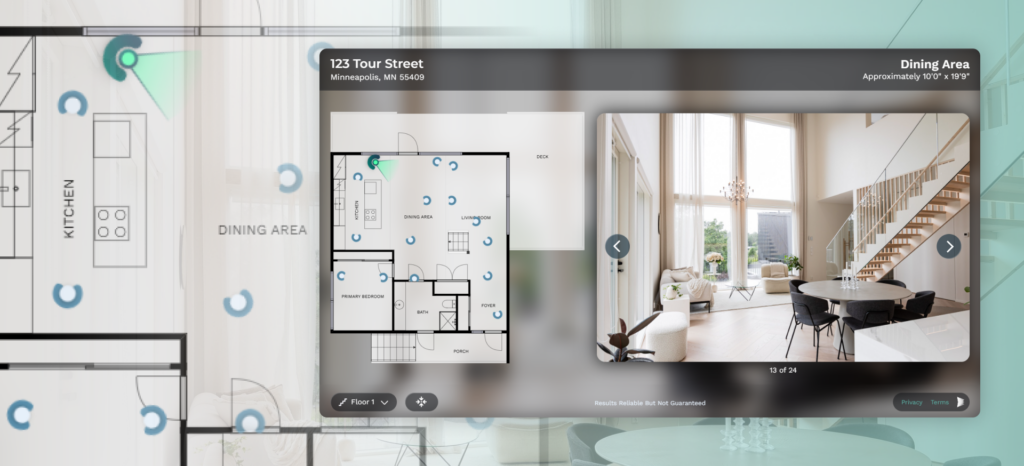
We are proud to announce the launch of CubiCasa Tour™!
Now you can generate an interactive virtual tour to enhance your real estate listings, using your same five-minute scan.
CubiCasa scan + listing photos = CubiCasa Tour™ (AI-powered virtual tour-showcasing photos and media of a property)
From the same 5-minute scan you already know and love comes a beautiful new AI-powered interactive floor plan product that:
- Helps you elevate your Listings in a beautiful new way, with no extra work
- Showcases your photos and media
- No need for cumbersome 360 cameras and expensive subscriptions for hosting your CubiCasa tours.
Steps to create a CubiCasa Tour™
- Scan a home using CubiCasa
- Purchase our “Plus” or “Plus 3D” product with your scan
- Upload your listing Photos to CubiCasa, and our AI will automatically place your photos and generate a beautiful Tour experience for you.
- From there, just grab the hosted URL for easy placement into your listing.
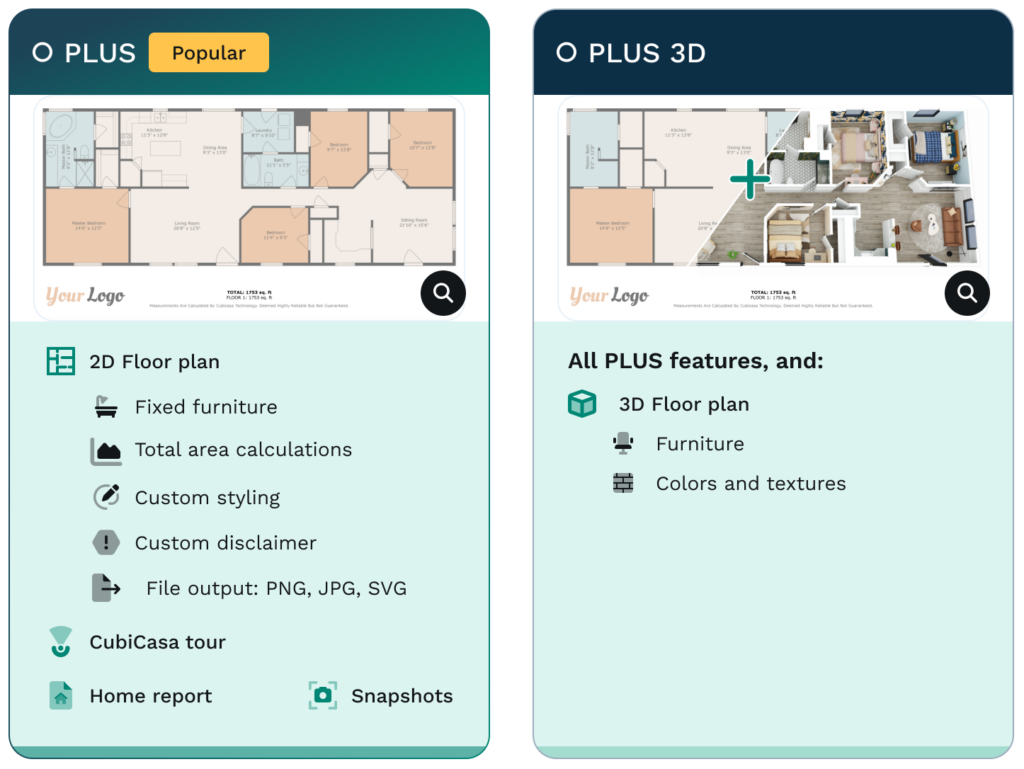
The PLUS and PLUS 3D package just got even better – same price, more features.
Purchasing the Plus Package not only gives you access to Fixed Furniture in 2D floor plans, the Home Report, and Snapshots, it also includes CubiCasa tour. Now you can add your beautiful listing photos to a CubiCasa PLUS order, you can generate an interactive floor plan (within minutes.)
Watch our Webinar about CubiCasa Tour
Testimonials
This simplicity is already winning over professionals in the field. Scott Prokop, Real Estate Photographer and early beta tester, praised the product as being, “Super easy to use!” He emphasized how CubiCasa Tour makes virtual tours accessible to everyone in the real estate space, regardless of technical experience.
Another beta tester, Ian Peters from ICP Marketing, added: “The CubiCasa Tour allows me to provide a virtual tour, but not at the higher cost as other offerings. And I don’t have to go through the trouble of taking all of the 360 photos throughout the house.”
Watch our Quick Tutorial
See below how you can easily create an interactive CubiCasa tour by combining your photos and floor plans:
If you don’t want to do it yourself, hire one of our CubiCasa Preferred Photographers here!
Frequently asked questions:
Q: What’s the turnaround time for CubiCasa tour?
A: A few minutes after photos are uploaded. To speed up the process, you can also upload photos before the floor plan is delivered!
Q: How many photos should I upload to generate the tour?
A: We recommend 1-3 photos per room.
Q: What is the price for CubiCasa Tour? How do I upgrade to PLUS or PLUS 3D?
A: Tour comes with Plus and Plus 3D (no extra charge). You can purchase these while ordering or upgrade an old Lite order to Plus.
Creating an Interactive Tour has never been easier than this!
Tip: Create Tours for recent PLUS scans for free
Try it on your recent PLUS or PLUS 3D scans (at no extra cost)*: choose the order you want to generate the tour
*We are able to create tours for scans processed after September 10, 2024